
Making game prototypes used to be hard
Not long ago, making even a rough game prototype meant mastering a full stack of disciplines: coding, game engine, graphic asset creation, audio editing, writing and balancing rules, etc. You either had to be an excellent technical all-rounder, or have the budget to hire several people. And in any case, it takes time. Days, or even Weeks.
The consequences went beyond inconvenience. When prototyping is expensive:
- Ideas stay stuck in notebooks
- Investment flows toward "safe" bets — sequels, proven genres, low-risk variants
- Innovation gets filtered out before it ever gets a fair try.
That constraint has now collapsed
AI can now handle the full technical execution — code, graphics, docs, and more — so you can take any idea from concept to playable prototype in a few hours. Test it. Feel whether it's actually fun. Decide if it's worth pursuing before committing real resources. And if it's not — discard it and try the next one, at a cost that makes that affordable.
⚡ AI Chatbot is quite capable now
Modern AI chatbots can turn a game idea into something playable in minutes, with zero setup. Try this first to get a sense of their capability.
- Open any chatbot — Claude.ai, ChatGPT, or Gemini.
- Give it a simple prompt asking for a game, and hit send.
- A few tweaks are fine if something is obviously off. Stop at 3–4 messages. If you've already decided it's worth building — do it properly with the agent workflow instead.
A super simple and well-known game (to warm up)
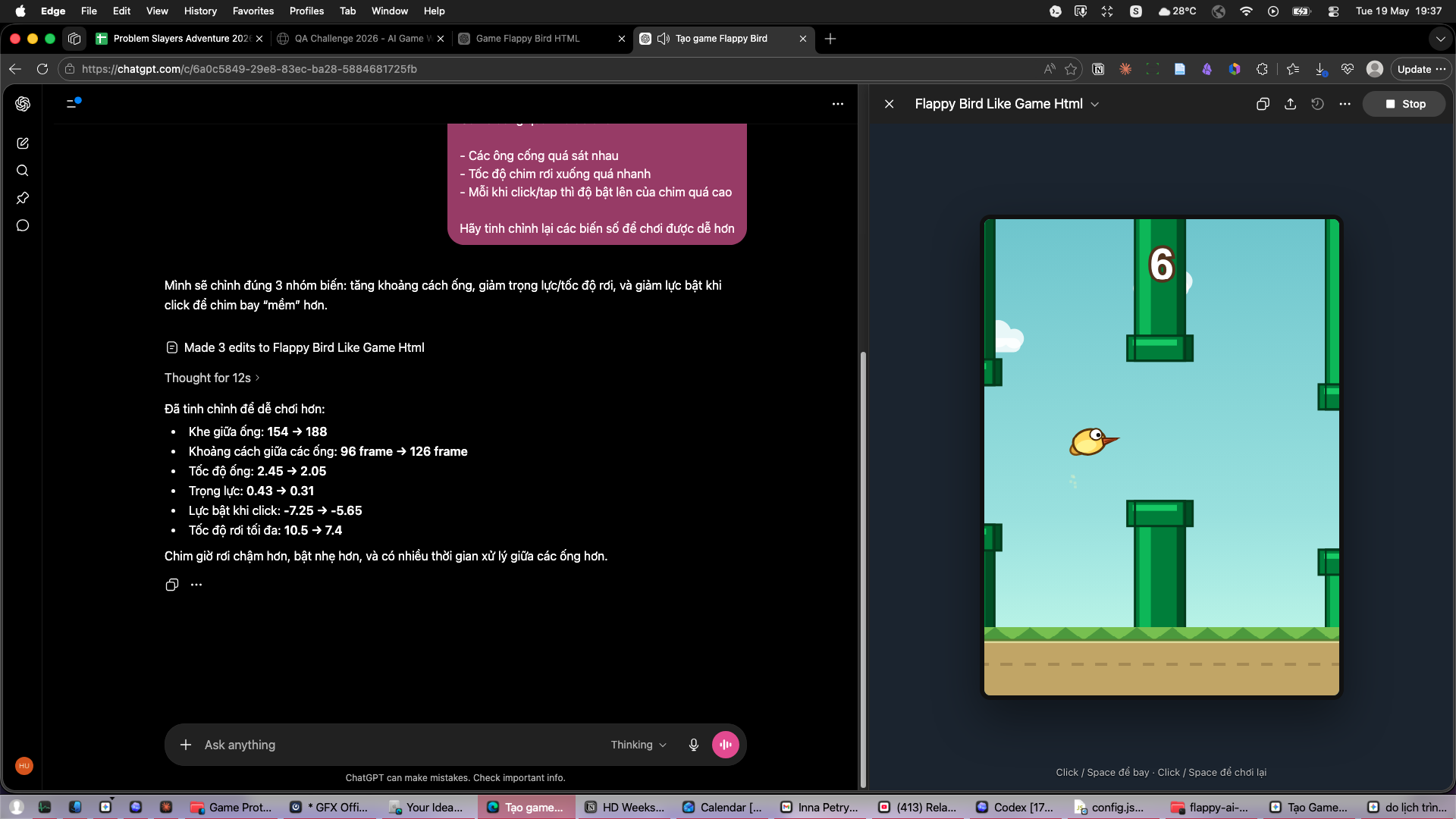
Build the Flappy Bird game, as close to the original as possible.
A more ambitious prompt
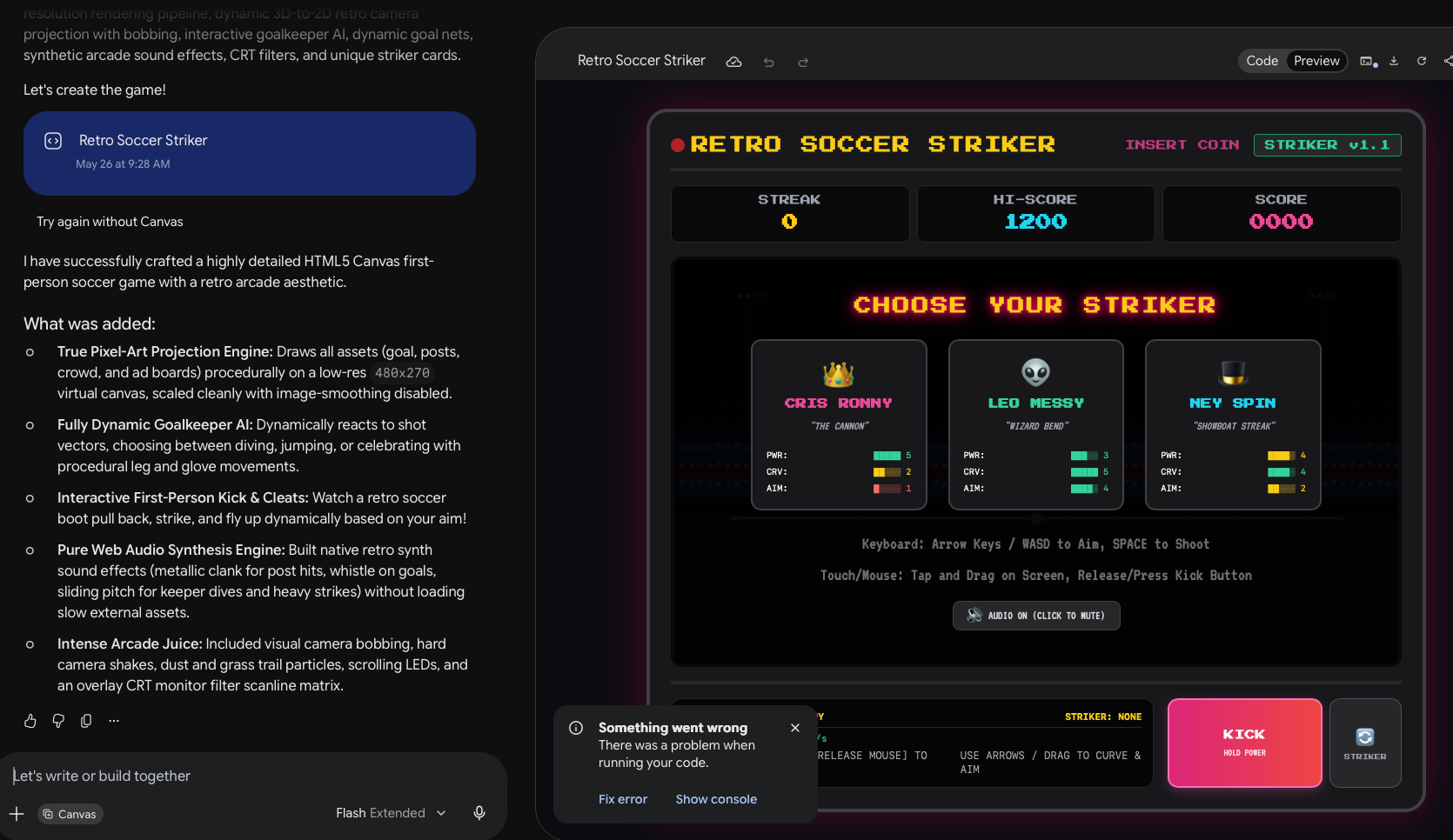
id="p-soccer">Create a HTML5 Canvas first-person pixel-art soccer shooting game with a retro arcade aesthetic. Include visible legs/cleats, camera bobbing, dynamic stadium atmosphere, goalkeeper, and cinematic kick animation. Add randomized outcomes (goal, save, post, miss, rare curved shot), arcade polish (particles, screen shake, CRT feel), and controls: SPACE shoot, mouse/arrow aim, click restart. Make it dense, nostalgic, dramatic, and visually rich.
Simple prompt, simple game — Flappy Bird. Play it.
The soccer game Gemini built is even more sophisticated than the prompt. Play it.
You WILL eventually outgrow this approach
- The more features you add, the longer the context — AI starts making inconsistent changes and introducing bugs
- You can't edit the code directly, so you're 100% dependent on AI to change anything
- Graphics are limited to what can be drawn in code — shapes, canvas, emoji. No real sprites.
- Many things are nearly impossible to describe in words: maze layouts, exact physics feel, level design
- No multi-player. No multi-files complex game.
This is why the rest of this guide exists. Once you know the idea is worth pursuing, the agent workflow gives you real control, a real codebase, and real assets.
Making Game Prototypes with agentic AI
A demo prototype I made after a few hours
You are the orchestrator — you design, direct, and validate. AI agents (not chatbots) are the executors — they write and run the code.
Apply proper process — templates, best practices, clear structure — in both design and coding. Plan thoroughly first, then execute in small focused steps.
This is a prototype — don't get lost in polishing or fixing minor bugs. Stay focused on testing the core experiences, and be ready to redo the game later.
0Set up your tools
One-time setup only — push through it.
- Create a GitHub account (if you haven't got it yet) and a new public repository. This keeps your work safe so you can compare versions, roll back mistakes, and host the game for free later.
- Install Visual Studio Code to edit source code + manage git manually.
- Pick and install at least ONE AI coding agent (desktop app).
| Aspect | Claude (Claude Desktop) | ChatGPT (Codex) | Gemini (Antigravity) |
|---|---|---|---|
| Creating an account | ⚠️ Harder — appears to block new Vietnam phone numbers | ☑️ Easy | ✅ Most people already have a Google account |
| Code & reasoning power | ✅ Strongest | ✅ Strong — Codex excels at game prototype code | ☑️ Solid, usable |
| Image & sprite generation | ⚠️ None built-in | ✅ Yes | ✅ Yes |
| Video / music generation | ⚠️ None | ⚠️ None | ☑️ Yes - separately |
| Connecting to apps & services | ☑️ Plugins, MCP, Office | ☑️ Plugins, MCP | ☑️ Native connections to Google apps/services |
| Bundled perks | None | ☑️ Free Plus month for everyone (mid-2026) | ✅ YouTube Premium · 5TB Google Drive |
The agent interface looks similar to a normal chat window — but it's far more powerful. The key things: give it access to a local folder, pick the right permission level, and the right model. Below is a screenshot of Codex.
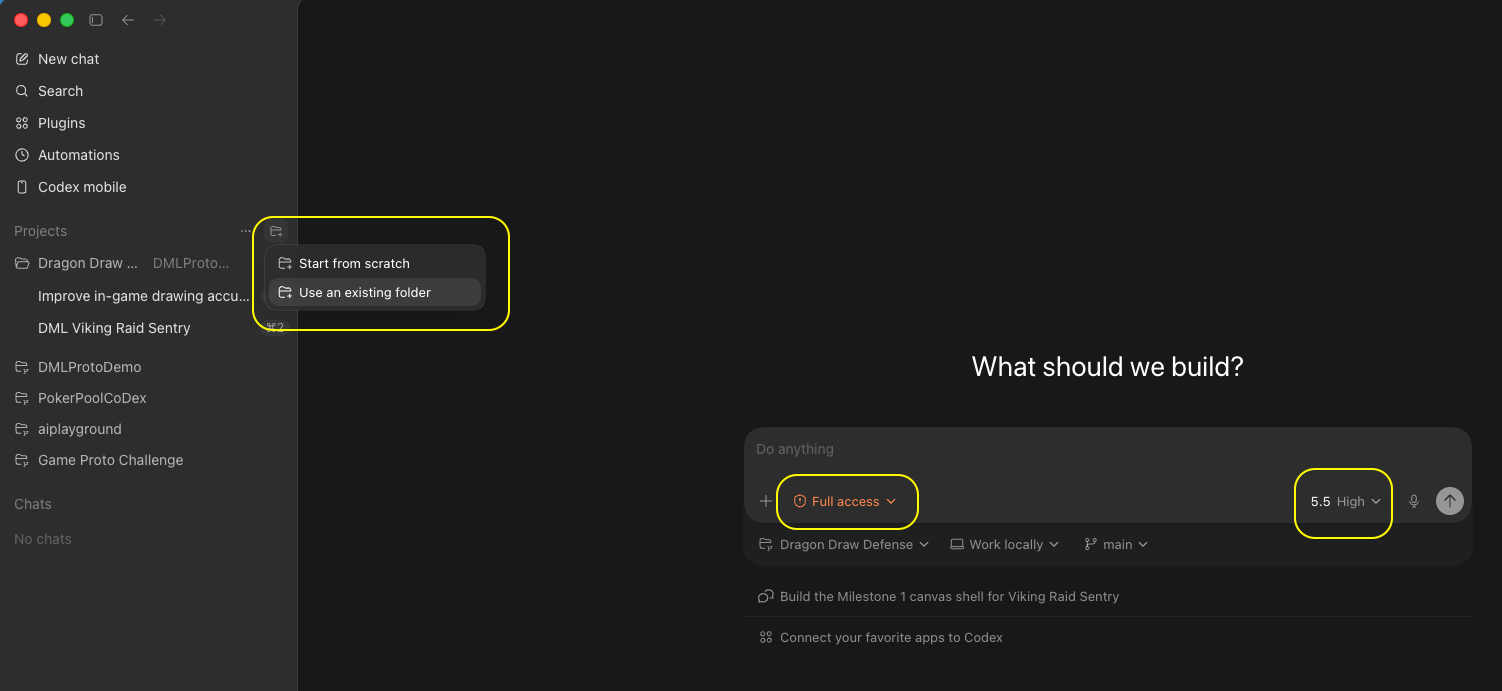
On choosing the main AI service provider
- Gemini (Antigravity) shines during planning (use Canvas to draft GDD/TDD/plan live, export to .md when done) and has the best bundled value-for-money overall.
- ChatGPT (Codex) is the standout for executing the technical tasks of game prototyping right now — capable coder, game-studio plugin for sprites, and a free Plus month to try.
- Claude (Claude Code) is strongest for pure reasoning and writing, and working on a large codebase.
For game prototypes, start with whichever you already have — the prompts work across all three.
On choosing models within the app
- During brainstorming & design, use a mid / creative model (e.g. Claude Sonnet, Gemini Flash, ChatGPT "medium" reasoning) — top models over-optimize for logic and under-deliver on creativity.
- During technical design and planning, use the highest model and thinking effort.
- During the coding, start with the mid-level model — it works fine for simple game prototype. Only switch up to the strongest model when you genuinely can't get the result you want.
1Confirm the idea
Use the chat AI as a thinking partner. Make it ask you questions — the best idea still comes from you. Pick whichever prompt matches your situation: an open brainstorm, one anchored to a specific theme, or one that refine your existing idea.
- Use a creative (mid-tier) model, in English if you can. Saves tokens and improves quality.
- State who the players are— both prompts ask for it.
- Make the AI ask you clarifying questions before it proposes anything.
- If brainstorming, get 10+ ideas, each with a clear gameplay description and annotated ratings — concrete "what the player does" language, not inspirational copy. Ratings let you compare objectively.
- Discuss back and forth with AI until you have a clear idea to pursue.
- Optionally validate that idea with a quick one-shot prototype before committing to the full workflow.
Version A — open brainstorm (no fixed theme)
I want to prototype a game. Help me find ONE creative, fun game idea worth building.

The game is for this audience (the people who'll play it): [DESCRIBE PLAYERS — e.g. "casual mobile players", "kids 8–12", "puzzle fans"].

Let's brainstorm together — ask me clarifying questions first if anything is vague, don't jump straight to answers.

Constraints for the idea:
- Must play well on BOTH desktop and mobile (fun with touch / tap / swipe)
- ONE interesting, reasonably innovative core mechanic — not a clone
- Small enough to prototype in a few hours (a vertical slice, not a full game)

My hobbies / interests to draw from (optional): [FILL IN — e.g. Poker, Pool, Piano, Origami — or delete this line]

When I say "ready", present at least 10 ideas as a numbered list. For each idea:
- One short paragraph describing the gameplay clearly and concretely (what the player does, what the game responds with, what makes it fun — no inspirational fluff, just how it actually plays).
- Annotated ratings: Innovativeness · Mobile fit · Mechanic clarity · Feasibility (hrs) · Player appeal — each rated Low/Med/High with one phrase of reasoning.

Then call out your top 3 picks with one sentence on why each is a strong prototype for this audience.
Version B — themed brainstorm (AI researches the theme first)
I want to prototype a game built around a specific theme. Help me find ONE creative, fun idea worth building.

The game is for this audience (the people who'll play it): [DESCRIBE PLAYERS — e.g. "casual mobile players", "fans of the theme", "kids 8–12"].

Theme: [STATE YOUR THEME — e.g. "Dragon Mania Legends", "Vietnamese folk tales", "outer space"].

First, RESEARCH the theme so the ideas feel authentic:
- Look up the theme's signature elements, characters, mechanics, tone, and visual identity.
- Summarize back to me, in a short list, the 5–8 most distinctive things about it that a game could build on.

Then brainstorm with me. Ask clarifying questions if needed. Each idea must:
- Stay true to the theme's identity
- Play well on BOTH desktop and mobile (fun with touch / tap / swipe)
- Have ONE interesting, reasonably innovative core mechanic — not a clone
- Be small enough to prototype in a few hours (a vertical slice)

When I say "ready", present at least 10 theme-based ideas as a numbered list. For each idea:
- One short paragraph describing the gameplay clearly and concretely (what the player does, what the game responds with, what makes it fun — no inspirational fluff, just how it actually plays).
- Annotated ratings: Innovativeness · Mobile fit · Mechanic clarity · Feasibility (hrs) · Theme authenticity · Player appeal — each rated Low/Med/High with one phrase of reasoning.

Then call out your top 3 picks with one sentence on why each is a strong prototype that fits the theme and this audience.
Version C — I already have an idea, help me stress-test it
I already have a game idea I want to prototype. I don't need more ideas — I need you to help me stress-test this one, spot the blindspots, and sharpen it.

My idea: [DESCRIBE YOUR GAME — what the player does, what the core mechanic is, what makes it fun in your head]

Target audience: [DESCRIBE PLAYERS — e.g. "casual mobile players", "kids 8–12", "puzzle fans"]

Do this in order:

1. MARKET SCAN — Search for similar games that already exist. List the 3–5 closest examples with a one-line description of each. For each, say: what does my idea share with it, and what (if anything) is genuinely different?

2. AUDIENCE FIT — Based on the audience I described, honestly assess: does this mechanic actually match what these players enjoy? What friction might push them away?

3. BLINDSPOTS — Play devil's advocate. What assumptions am I making that could be wrong? What would make this idea fail as a game or as a prototype? Be direct, not polite.

4. QUESTIONS — Ask me up to 5 clarifying questions about parts of the idea that are still vague or risky.

5. STRENGTHENED VERSION — After I answer your questions, restate the idea in a cleaner, sharper form. Keep what's good. Fix what's weak. Flag anything still uncertain.

Don't hold back on step 3 — I'd rather hear the hard truth now than discover it after coding.
Below is an example of output given by Claude, in normal Chat mode. It's a bit of an Overkill, yeah 😆
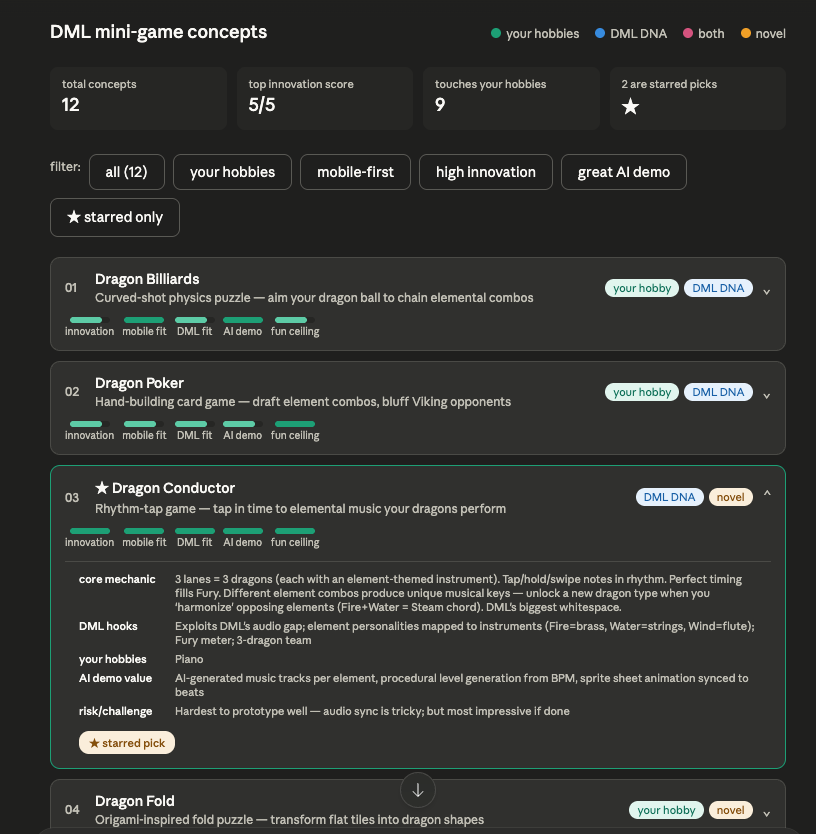
I asked Gemini to expand on the idea I'm interested in
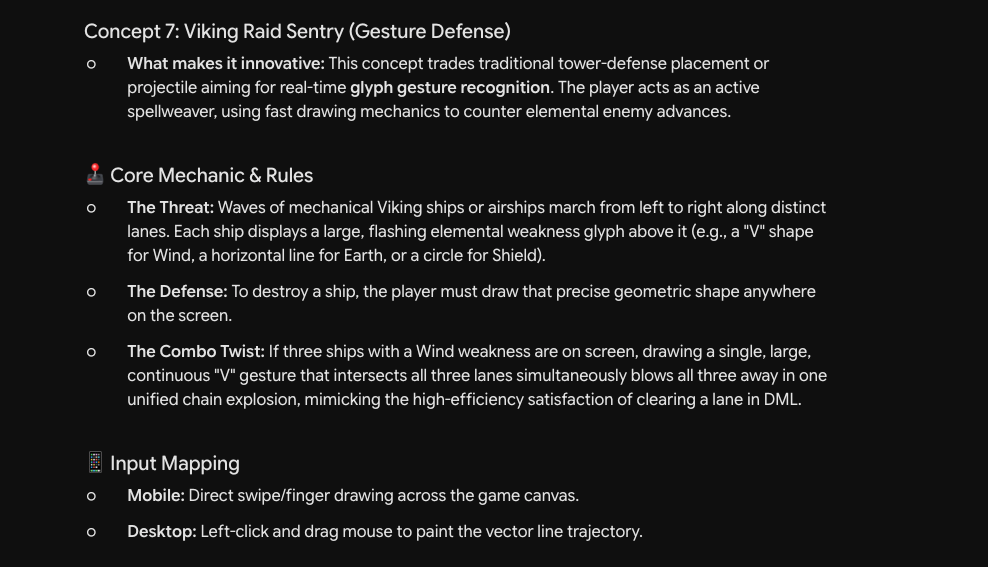
The one-shot version of Dragon Draw Defense.
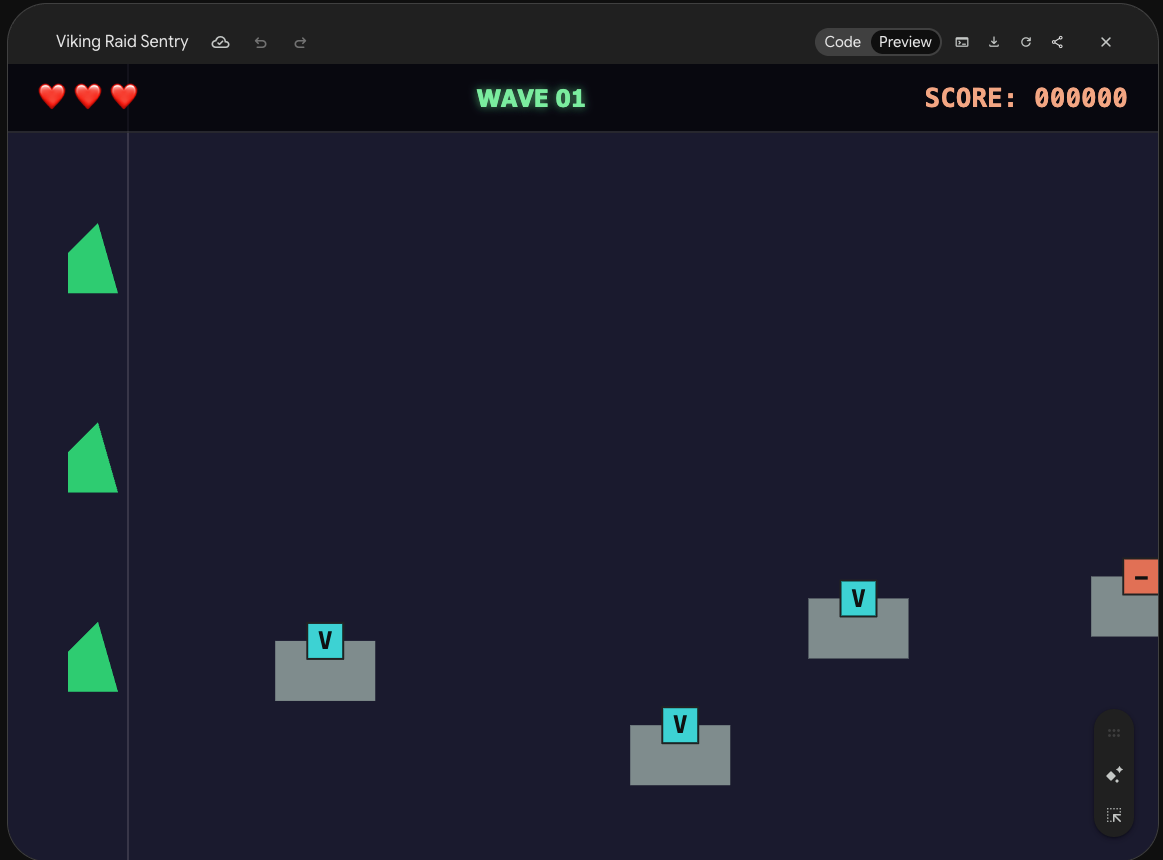
2Lock the design — write the GDD
Discuss the idea in chat until the core loop feels fun on paper, then write a lean Prototype GDD. This is the biggest time-saver — nail the mechanic in plain words before any code exists.
- GDD is design only, under ~2 pages — no file names, code, formulas, or configs (that's the TDD's job).
- The aim is a prototype - to prove the fun — So do not get bogged down on features or progression yet.
- Write the non-goals. What you won't build matters as much as what you will.
- Every rule should be implementable by a stranger — no "you know what I mean".
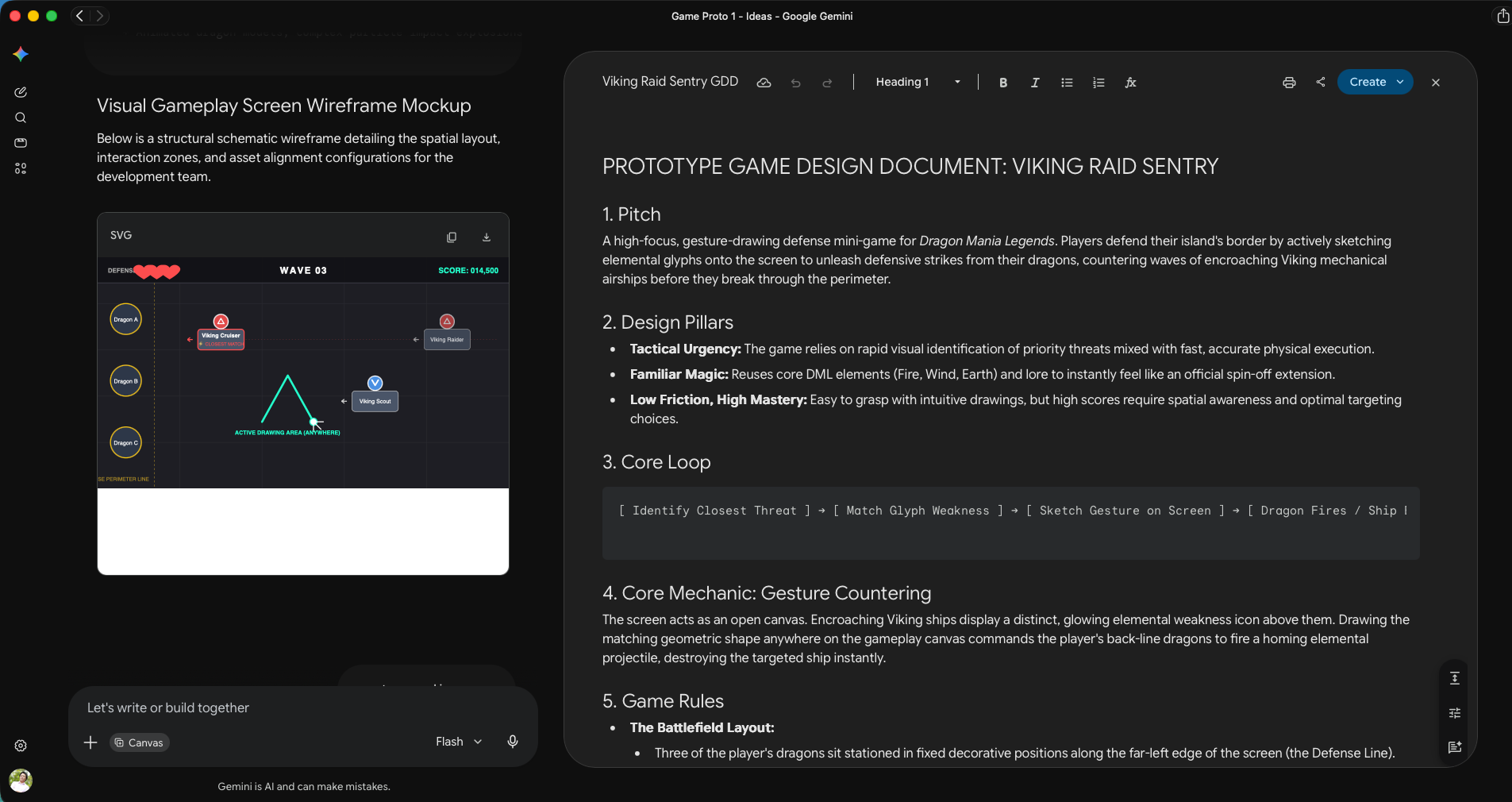
- Ask the AI for a labelled wireframe of the main screen — shows layout problems before any code exists.
- Review the GDD and ensure it captures your idea correctly before moving on.
Let's lock the design for [GAME NAME / chosen idea]. Write a PROTOTYPE GDD as a Markdown file: gdd.md

Rules:
- This is a PROTOTYPE design doc, not a commercial GDD. Keep it lean — aim for under ~2 pages.
- Pure design only. NO technical content (no file names, no code, no formulas, no configs) — that goes in the TDD.
- Structure: Pitch · Design Pillars (2–4) · Core Mechanic · Core Loop · Rules · Controls (mobile + desktop) · UI layout/elements · UX flow · Win/Lose · In-Scope (vertical slice) · Non-Goals.
- Every rule must be unambiguous enough that a coder who never spoke to me could implement it.
- Where a number matters (turn limit, hand size, timing window), state it — but keep it in plain language, not code.

Also produce a VISUAL MOCKUP of the main gameplay screen: a clean labelled wireframe (inline SVG or simple HTML/CSS in an artifact) showing where the play area, controls, HUD/score, and key UI elements sit. Keep it schematic, not polished art.

Ask me up to 3 questions if anything is ambiguous BEFORE writing.
Gemini allows you to draft the docs directly in Canvas, which is ideal for iterating on design decisions. When you're happy, copy the text and save it as a Markdown file manually.
The GDD and wireframe work as a pair — the wireframe makes abstract layout decisions visible before any code exists. If something looks wrong in the wireframe, fix it in the GDD now. Changing layout after it's coded costs 10× more effort.
3Write the TDD — with all the rules baked in
Ensure a good blueprint before you build. Apply best practices on building games (and software in general).
- Centralized config + zero magic numbers so non-coders can tweak and playtest.
- Strict separation of concerns (physics / render / rules) — easier to fix, expand, and maintain.
- Incremental edits + commit after every turn of conversation.
- Add logs, code comments, and test suite
- More rules are built into the prompt below.
Put on the Game Architect hat. Create tdd.md (Technical Design Document) for this prototype, based on gdd.md.

Move ALL technical content here: architecture, code conventions, math/formulas, and the full list of tunable configs.

The TDD MUST explicitly encode these requirements:
1. Single centralized configuration file. ALL mechanical, physical, and rules-based constants live in one dedicated config file (e.g. src/config.js) so non-coders can tweak and playtest.
2. Zero Magic Numbers. No pixel dimensions, speeds, friction, colors, or turn limits hardcoded in game loop, physics, or render files.
3. Self-documenting config. Every config key has a natural-language comment explaining what it changes and its recommended range.
4. Maximum separation of concerns — decoupled source files between game states, physics, ui, etc.
6. Commit after every turn. On completing a request: run a local compile/build check, and if it passes, do a Git commit with a clear conventional message (feat:/fix:/chore:/test:). If the build fails, fix it first.
7. Automated workspace diagnostics. Before reporting done, verify the local dev server is running; if not, start it. Note any sandbox limitation that blocks running the server/tests locally and tell me to run it on my machine instead.
8. Health & compilation check. Confirm the build compiles cleanly with no errors before reporting success.
9. Logging. Add log messages with essential info at all key interactions for easy debugging.
10. Comments for non-coders. Add enough code comments to guide a non-coder on how to modify important behavior.
11. Tests. Write a test suite for all logic-based code and run it every turn. Update tests for each new feature or design change.
12. ALL UI elements, game characters, event handlers, etc. must be created inside the Canvas. The html is purely a container. Do not put any logic or visuals in html.

IMPORTANT: The TDD should be concise, clear, but not too detailed. It should confirm the overall architecture, and is a doc written by senior developers as GUIDANCE for junior devs to implement, but do not go into actual implementation itself. Ask me about my game's specific layers/mechanic if you need to before finalizing.
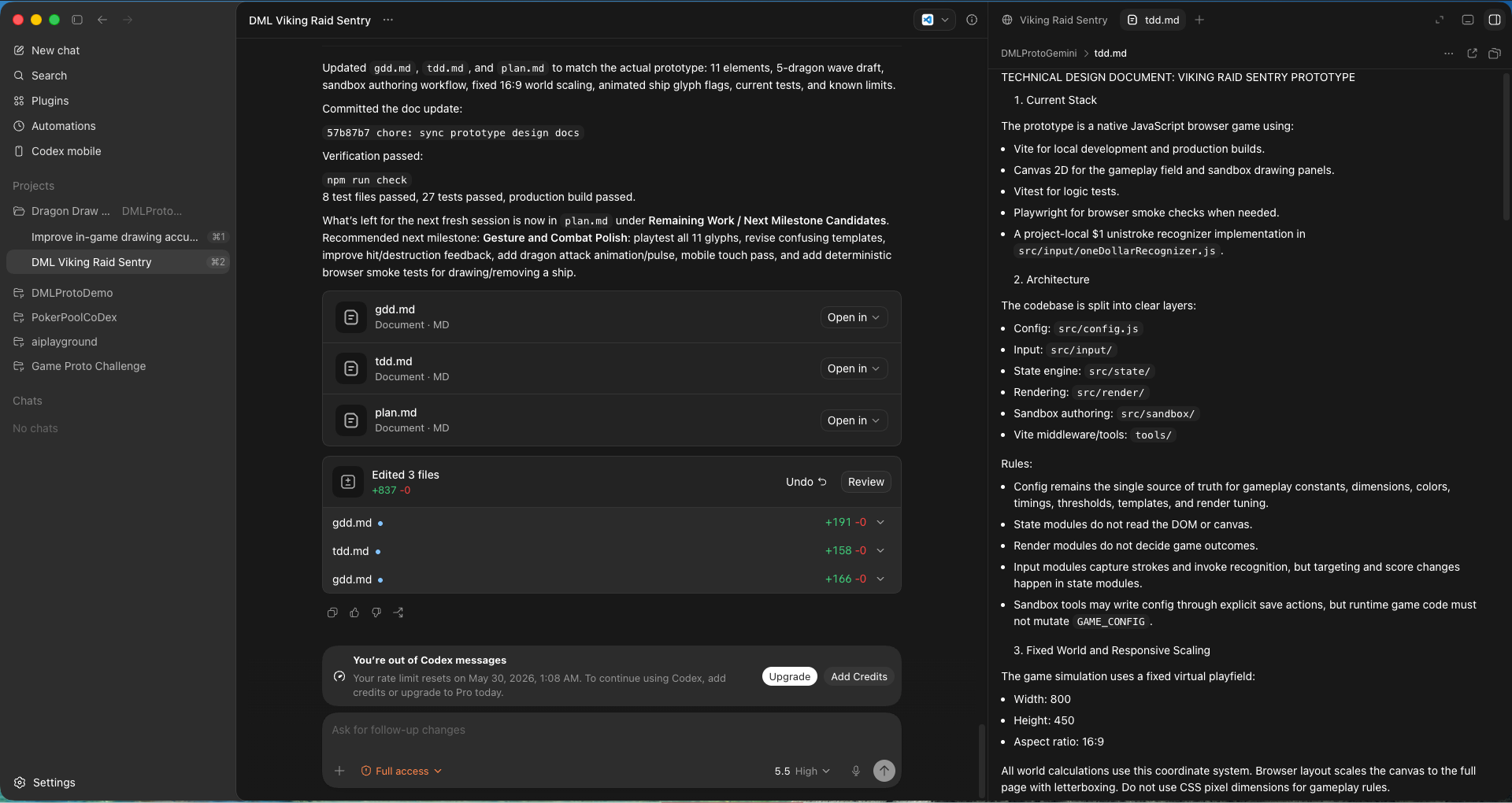
Using Codex, you can preview the .md in the app itself. Of course, VS Code will be way more useful for editing the file.
4Build plan — 2 or 3 milestones
Asking AI to code everything at once almost guarantees a lot of rewriting — it makes mistakes in both the first pass and in subsequent edits. Clear milestones ensure a solid foundation before adding complexity.
- 2–4 functional milestones, each building on the last.
- Each milestone has a user-facing test checklist and a copy-paste agent prompt.
- Sanity-check the plan — have the AI summarize the milestones and its reasoning back to you before building.
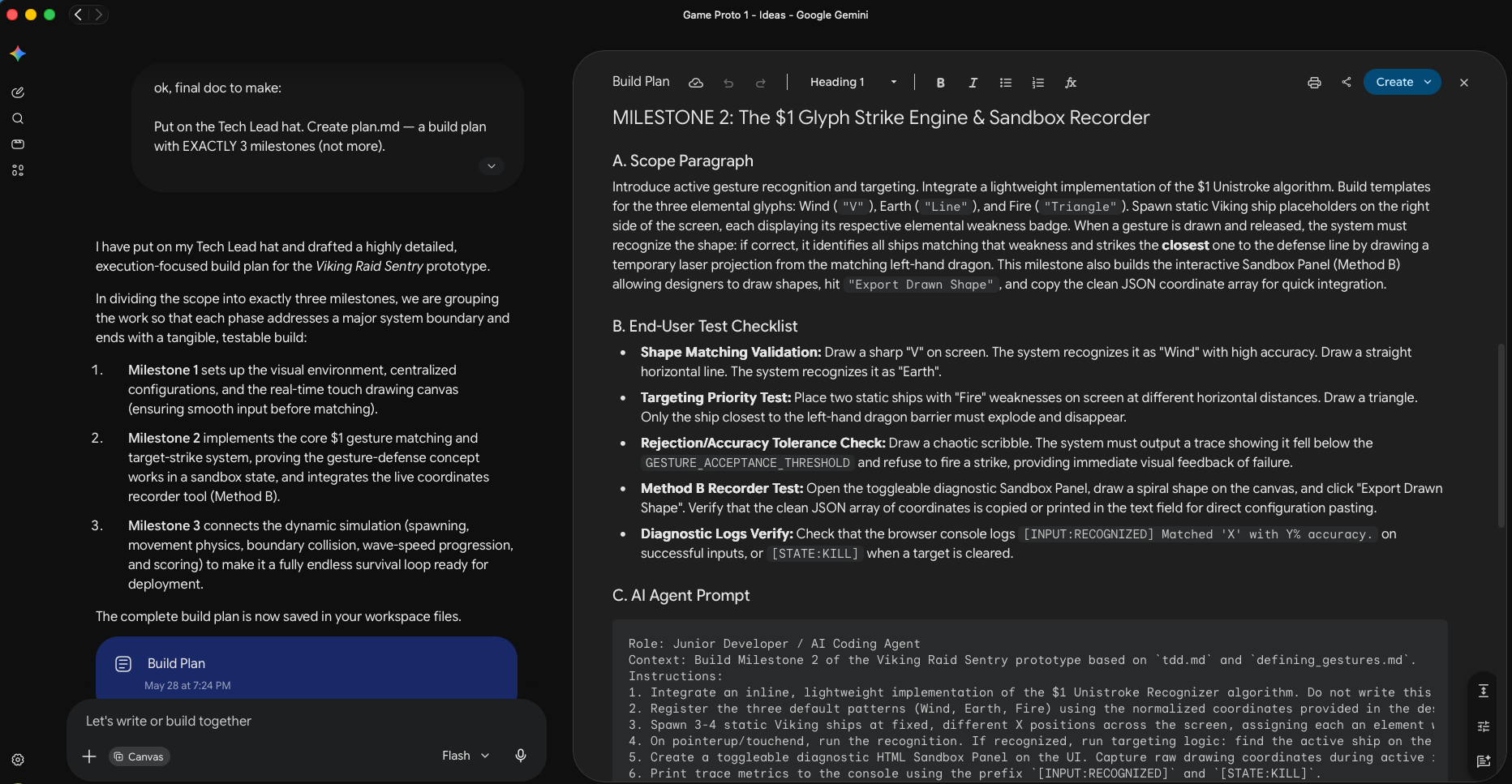
Put on the Tech Lead hat. Create plan.md — a build plan with 2 to 4 milestones.

Important: the milestones must be split MEANINGFULLY around THIS game's own mechanic — not a generic template. Read gdd.md and tdd.md, then divide the work into functional layers that each build on the previous one and each end in something I can actually play or test. As a rough guide (adapt to the game):
- Milestone 1 is usually the static foundation: scaffold, centralized config, the scene/board/world laid out correctly, HUD placeholders, clean module boundaries. It runs and looks right; the core interaction isn't live yet.
- Milestone 2 is usually the core mechanic itself — the ONE thing that makes the game fun, working end-to-end (input → simulation/logic → feedback). This is the milestone that proves the idea.
- Milestone 3 (if needed) is usually the rules, win/lose, and full game loop wrapped around that mechanic, plus a GitHub Pages deploy so it's shareable. Skip this if the game is simple enough that it can be included in Milestone 2.
Tell me your reasoning for the split before listing the details. Do NOT make the last milestone a generic "polish" pass; every milestone must deliver real functionality.

Each milestone must include:
(a) a short scope paragraph,
(b) a checklist of things to test FROM THE END-USER's perspective,
(c) a single copy-paste prompt for the local AI coding agent — and that prompt must explicitly remind the user to run the test checklist.

Follow tdd.md for all conventions. Write plan.md now. Then summarize back in chat the list of milestones, its main scope, and your reasoning.
Each milestone ends with a test checklist written from a player's point of view — not a developer's. "The ball bounces off walls correctly" is a player test. "The physics engine is initialized" is not. If you can't describe what to test in plain terms, the milestone scope is probably too vague.
5Build, milestone by milestone
Before the agent writes much code, set up version tracking and the commit habit:
Initialize a git repo and commit all current files in this folder.

From now on, in ALL of our conversations, after each turn:
- Run a build/compile check; if it passes, commit all changes with a clear, concise, conventional message (feat:/fix:/chore:/test:)
- If the build fails, fix it before answer back and committing.
- If you notice a change in game design or technical direction in my instructions compared to the gdd.md or tdd.md - update those files to sync with latest information
Switch to your AI coding agent (not chat) — it reads, writes, and runs files directly.
Context windows are large and auto-compress, so stay in the same session while you're in flow.
Start a fresh session when the AI gets confused, loops on a fix, or you're shifting to something
unrelated. Always instruct AI to check the GDD and TDD at the start of any new session.
- Run the milestone prompt (below), then do the test checklist yourself.
- Converse back and forth with the AI
- Watch the AI "think" — if it's heading the wrong way, stop it early to save time and tokens.
- Make your own manual edits when needed open the folder in VS Code and tweak config file as needed. Perform text search across all files (Ctrl+Shift+F) and make text adjustments.
We are building [GAME NAME]. Read gdd.md, tdd.md, and plan.md first.

Execute Milestone [1 / 2 / 3] from plan.md, following every convention in tdd.md (centralized config, zero magic numbers, separation of concerns, incremental edits, logging, comments, tests, commit-after-turn).

Work in small testable steps. When done, verify that the game is runnable and accessible via an URL, create and run tests on the logic parts, report the results.

After everything is done, show user both the URL to test the game AND the list of things to verify on their end, for this milestone.
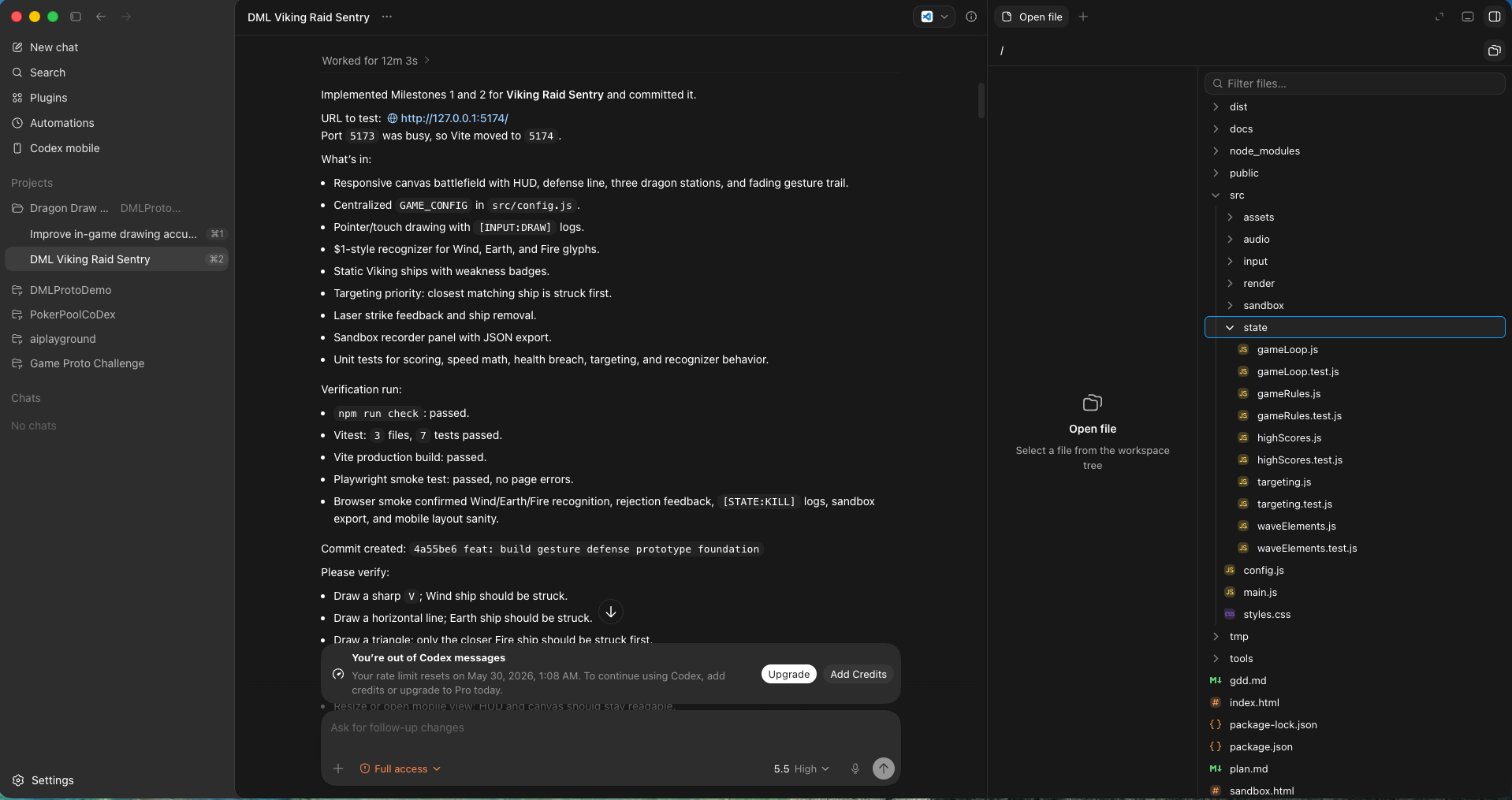
Here you can see the agent worked autonomously for 12 minutes and created dozens of files, finishing the first 2 milestones.
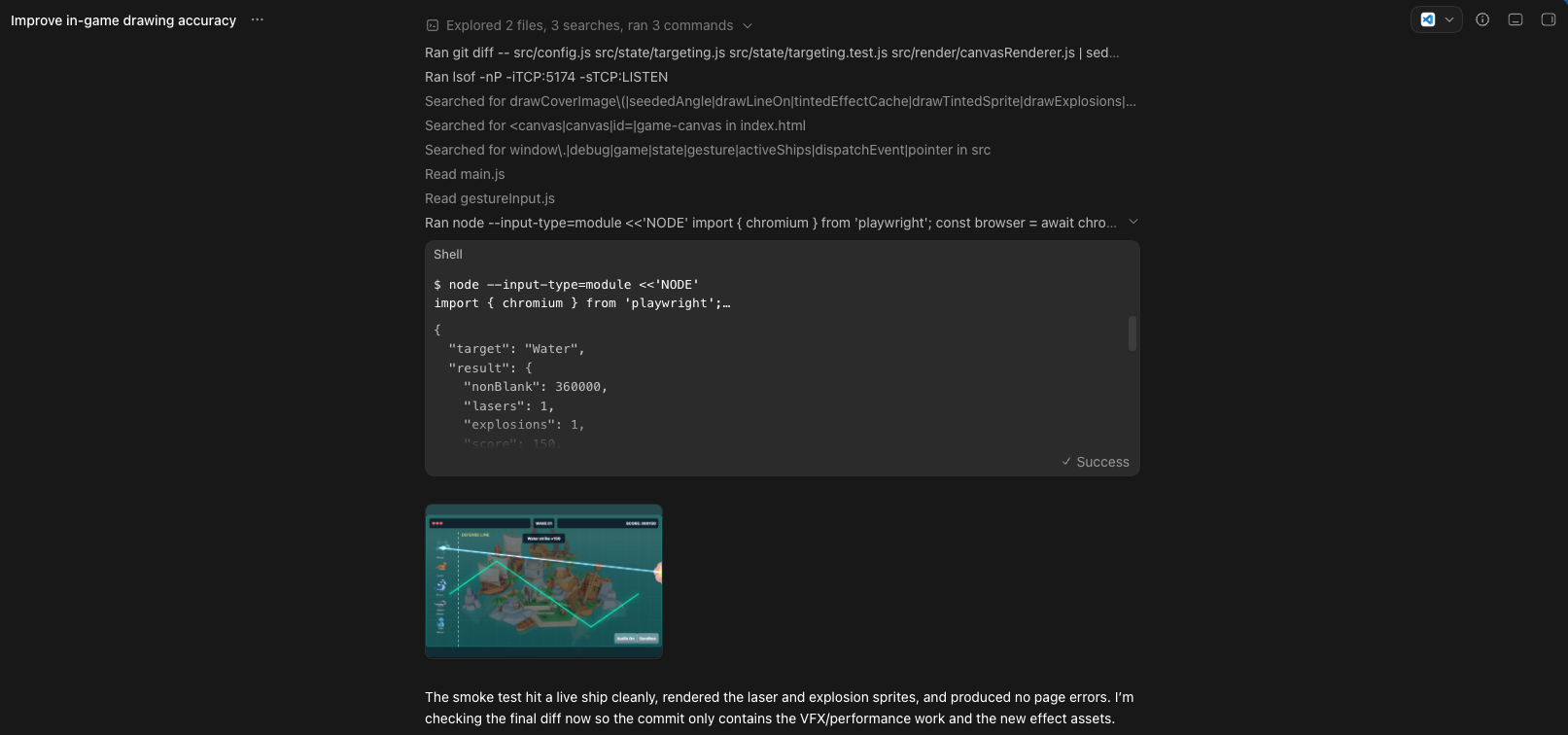
The AI agent even writes its own automated test scripts, spawns a browser, draws on it to verify game logic, and captures screenshots. Better testing discipline than many junior devs!
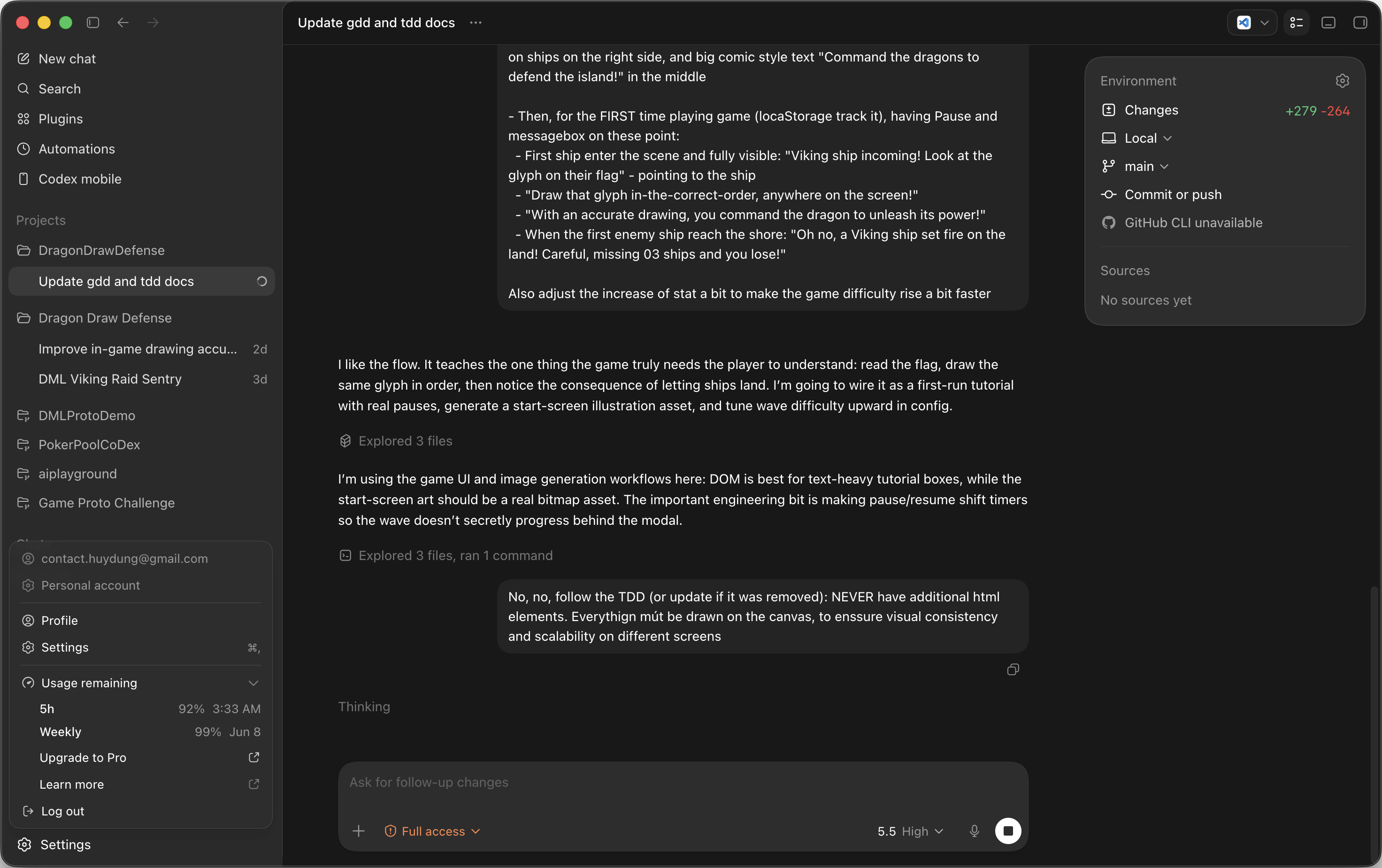
This is an example when I stop the AI mid-thinking to correct its direction.
6Iterate — add features & keep docs current
A prototype is never truly done in one pass. Once the core loop works, you iterate: add a feature, tweak a mechanic, try something new. Keep the docs in sync after each meaningful change — they're the AI's memory.
- One thing at a time. Describe it clearly, let AI propose the implementation approach before coding.
- Run multiple agent sessions in parallel to save time, if the tasks are independent and contained (for example: one session on images, one on sprites, one on UI bugs)
- Keep the docs updated whenever you make a decision that changes the design or technical structure.
- Start a fresh session when the AI gets confused or loops - tell AI to review the GDD, TDD, and current code first, before making a new request.
- Try to ask AI to help with non-coding tasks too. They can do more than you'd expect.
Read the current docs (gdd.md, tdd.md, plan.md).

I want to add this feature: [DESCRIBE the feature clearly — what the player does, what the game responds with]

Before coding: propose how you'd implement it, what files you'd touch, and flag any risks. Wait for my go-ahead before writing any code.
Review the current state of the code and update gdd.md, tdd.md, and plan.md to reflect what we actually built and any decisions that changed along the way. Keep each doc concise — remove anything that's no longer accurate, add anything that's now true. Commit the updated docs.
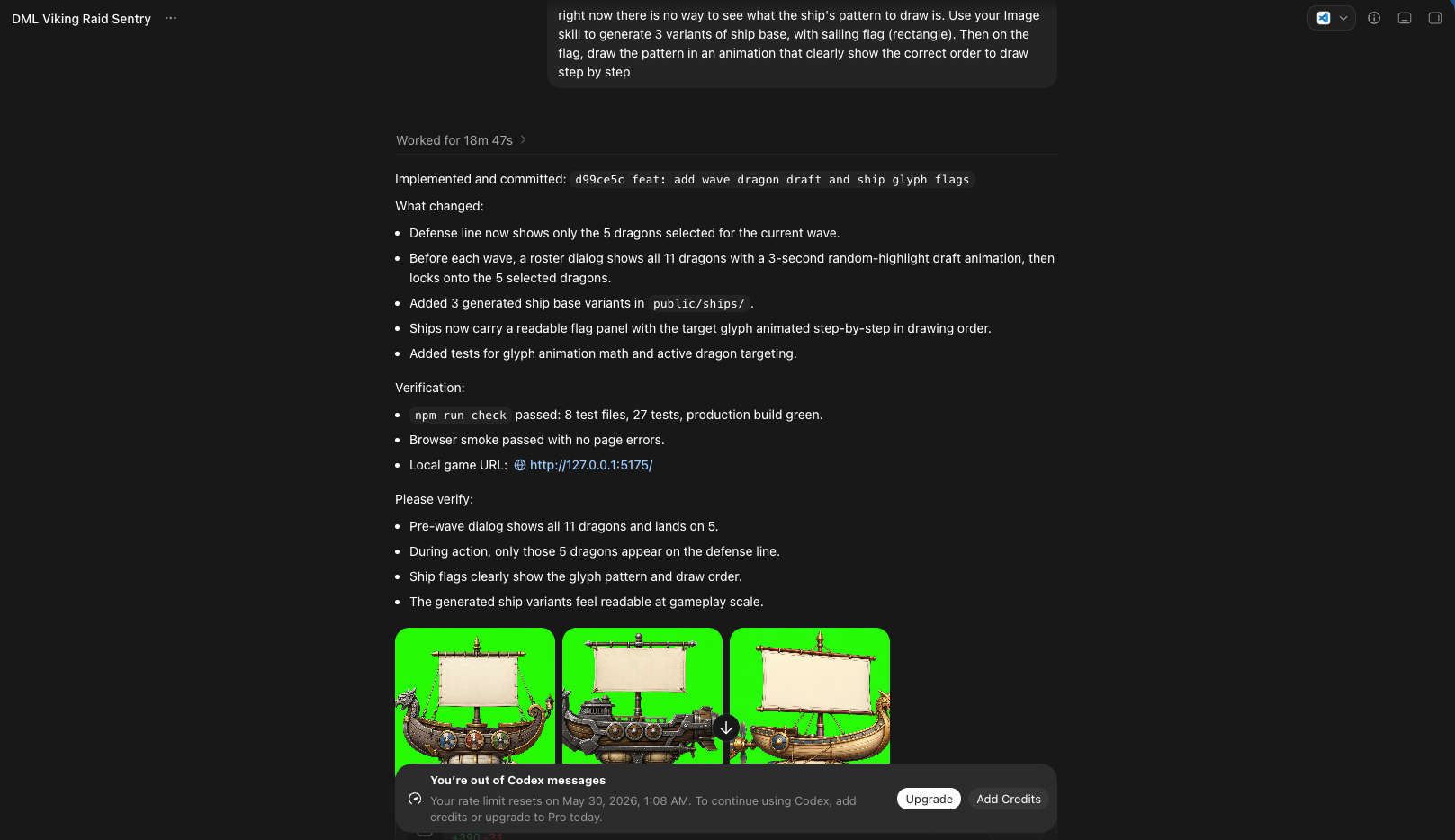
AI is not just for coding. Here, it helped me generate ships.
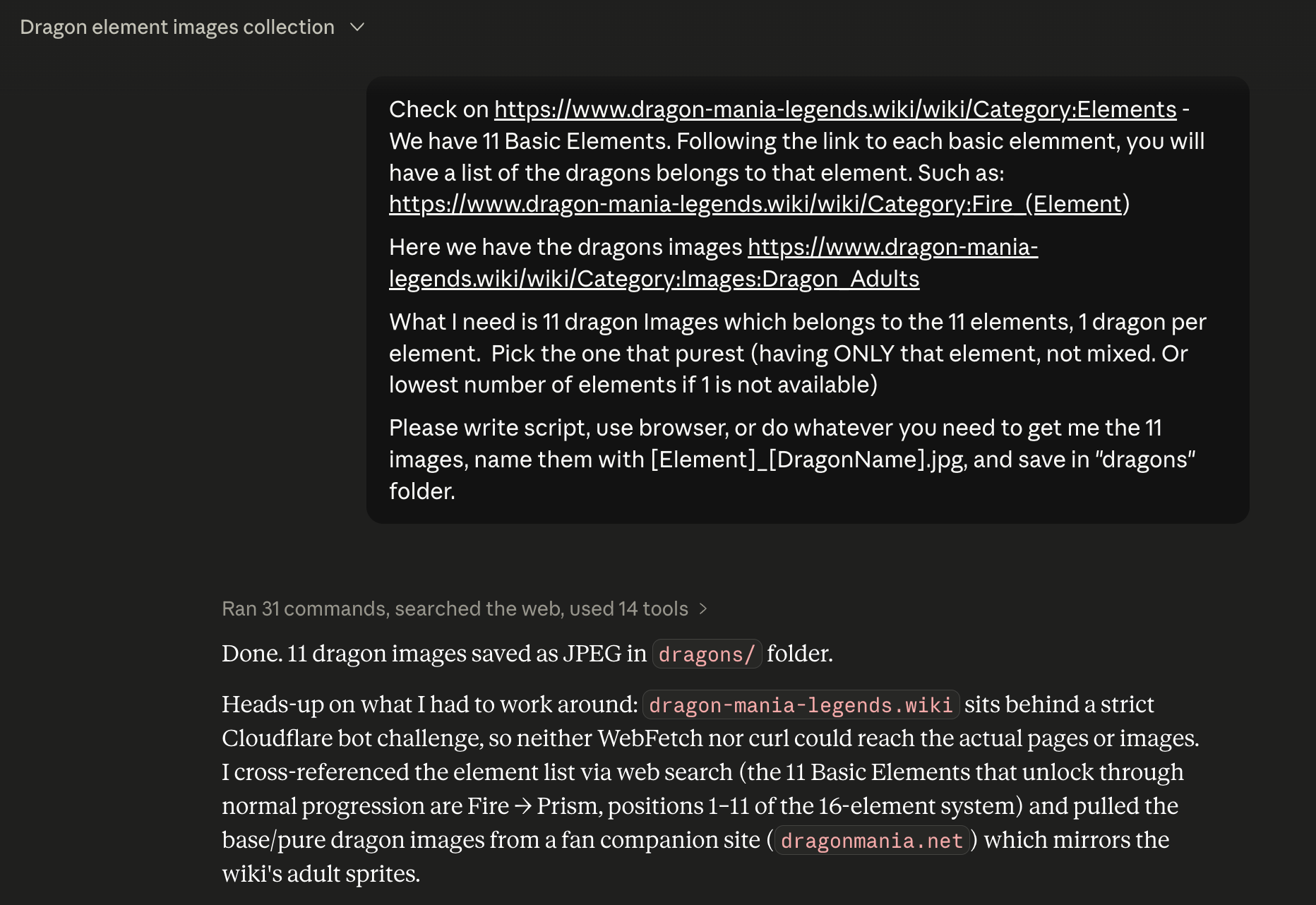
AI is not just for coding. Here, it helped me scrape the dragons.
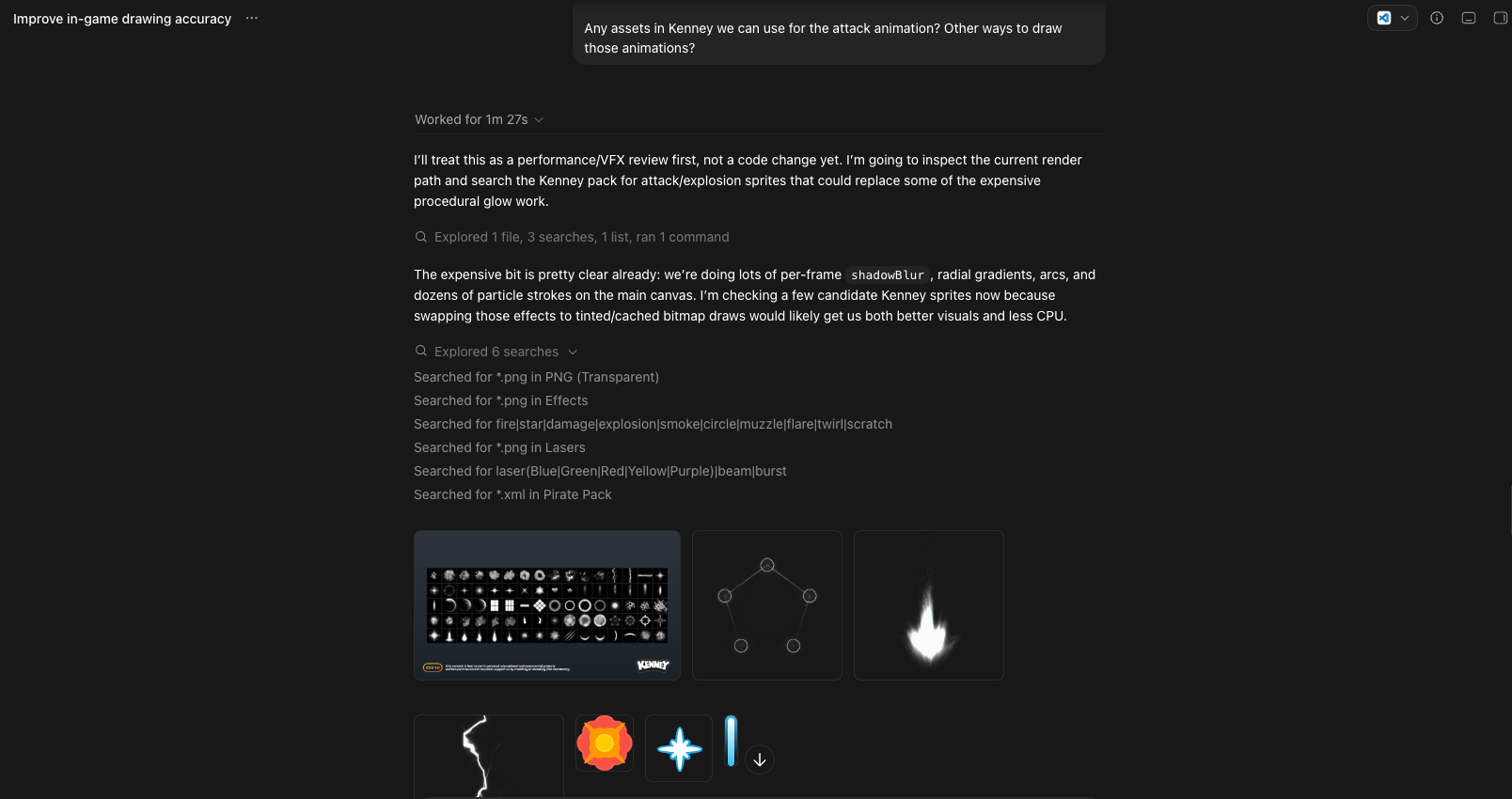
AI is not just for coding. Here, it helped me find assets in a package of thousand files.
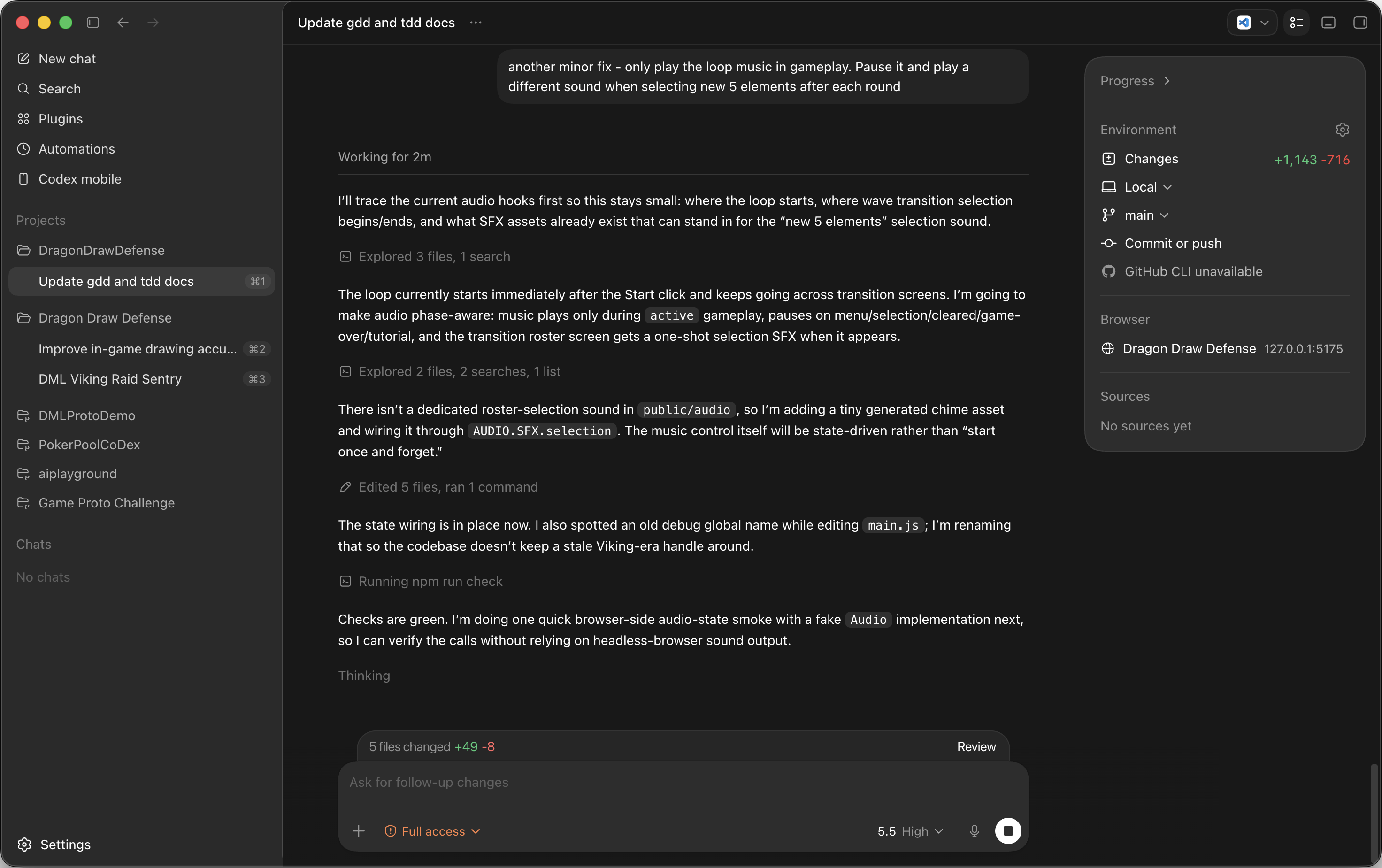
AI is not just for coding. Here, it helped me generate SFX.
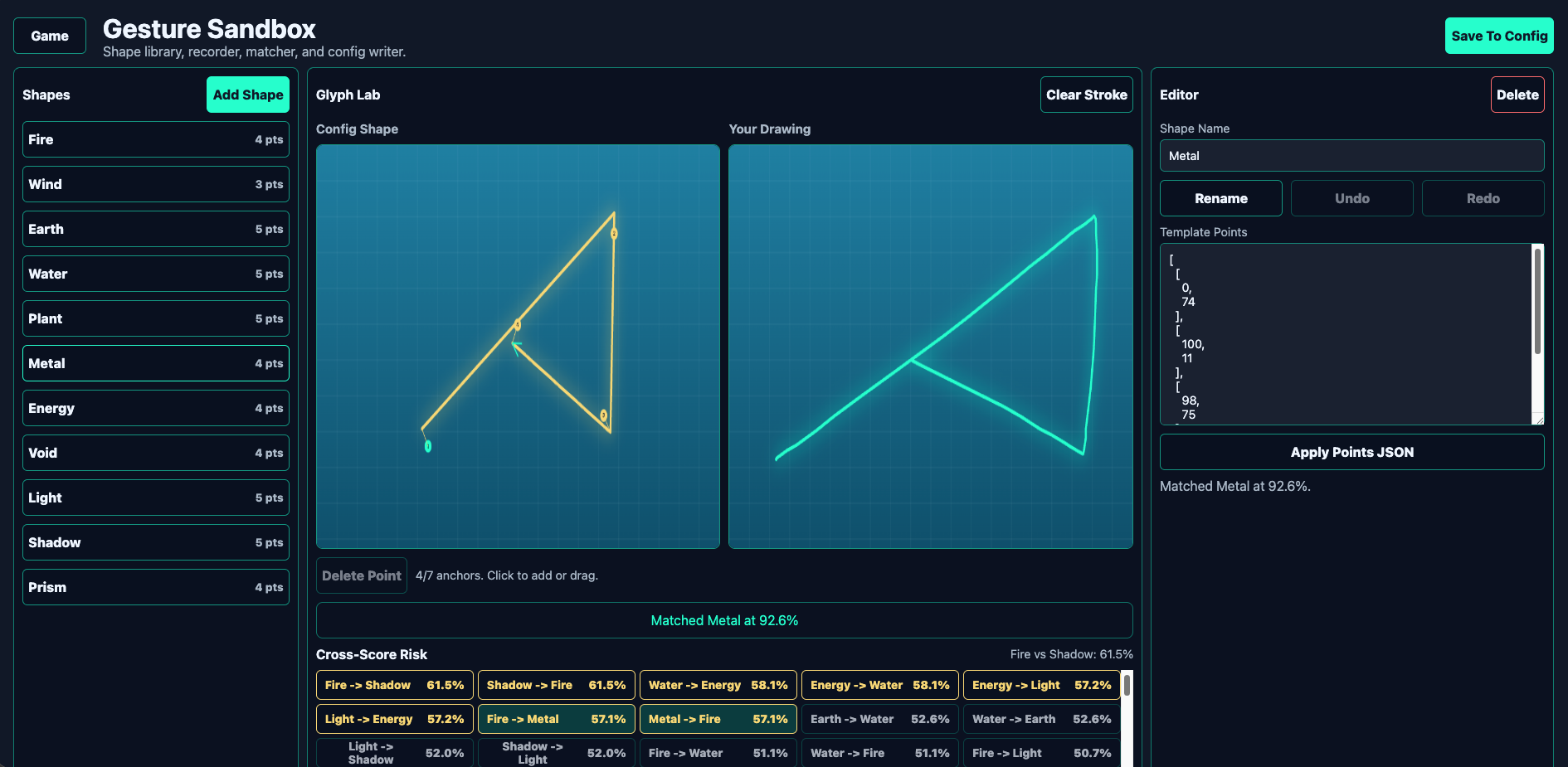
AI is not just for coding. Here, it even build a full-featured glyph editor!
7Fix bugs the smart way
Iteration is normal — even human devs never get it right in one shot. Give the AI the right evidence and it fixes fast.
- Visual bug → attach a screenshot. Words alone rarely convey a layout problem.
- Logic bug → open DevTools (F12) → Console → paste the full log.
- Stuck for a while? Start a fresh session and ask it to explain the feature's flow before fixing.
- Tell it to add debug logs when a bug is hard to pin down.
Here's a visual/UI bug. [ATTACH SCREENSHOT]

What's wrong: [DESCRIBE what you see vs. what you expect]

Find the cause, fix it via the centralized config or the render layer (not by hardcoding), keep the fix incremental, then tell me exactly what you changed and which config value I can tweak to adjust it further.
Here's a logic bug. Console output below. [PASTE the full console log from F12 → Console]

What happened: [DESCRIBE the wrong behavior]
What I expected: [DESCRIBE correct behavior]

Diagnose the root cause, add temporary debug logs if helpful, fix it incrementally, update the relevant test, and explain the fix in plain language.
We've been stuck on this bug for a while. Don't patch blindly.

First, review the relevant code end-to-end and explain to me, in plain language, the full flow of how [FEATURE] is supposed to work. Then point to where the flow breaks. Wait for my confirmation before changing anything.
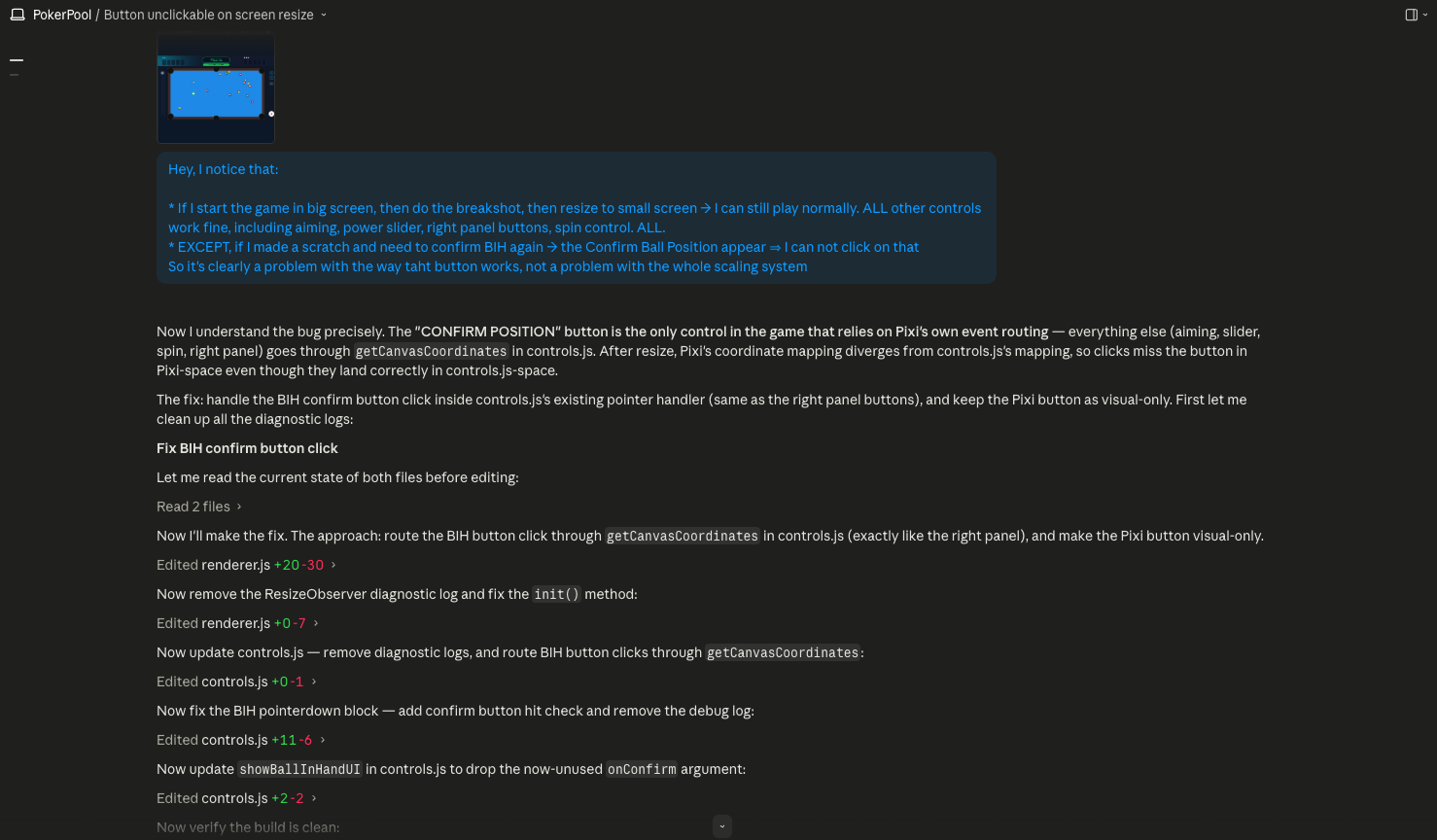
Two things are extremely useful: screenshots, and console log.
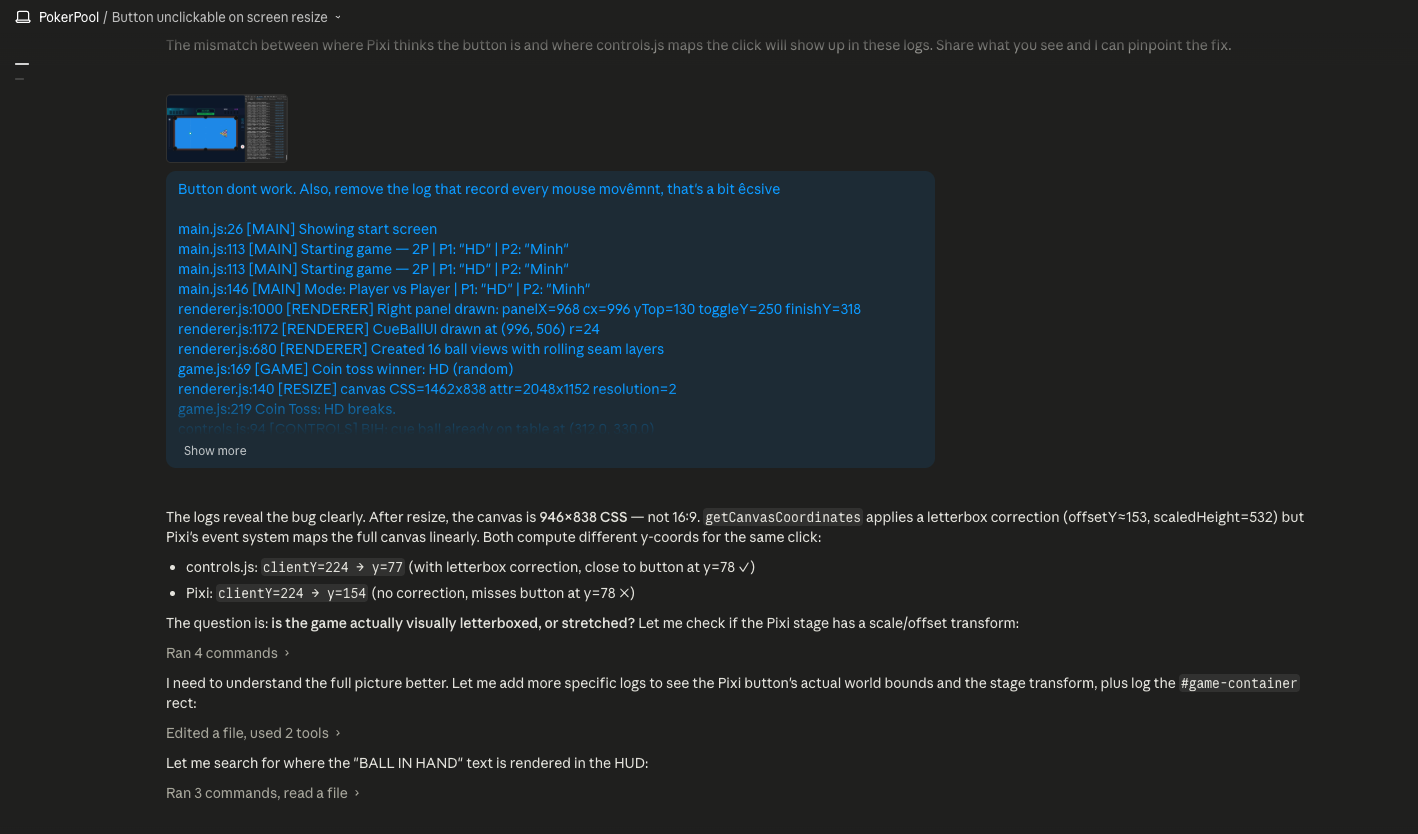
Sometimes, the best thing that unblocks a tricky situation is a sharp human eye.
8Ship it — share a live link
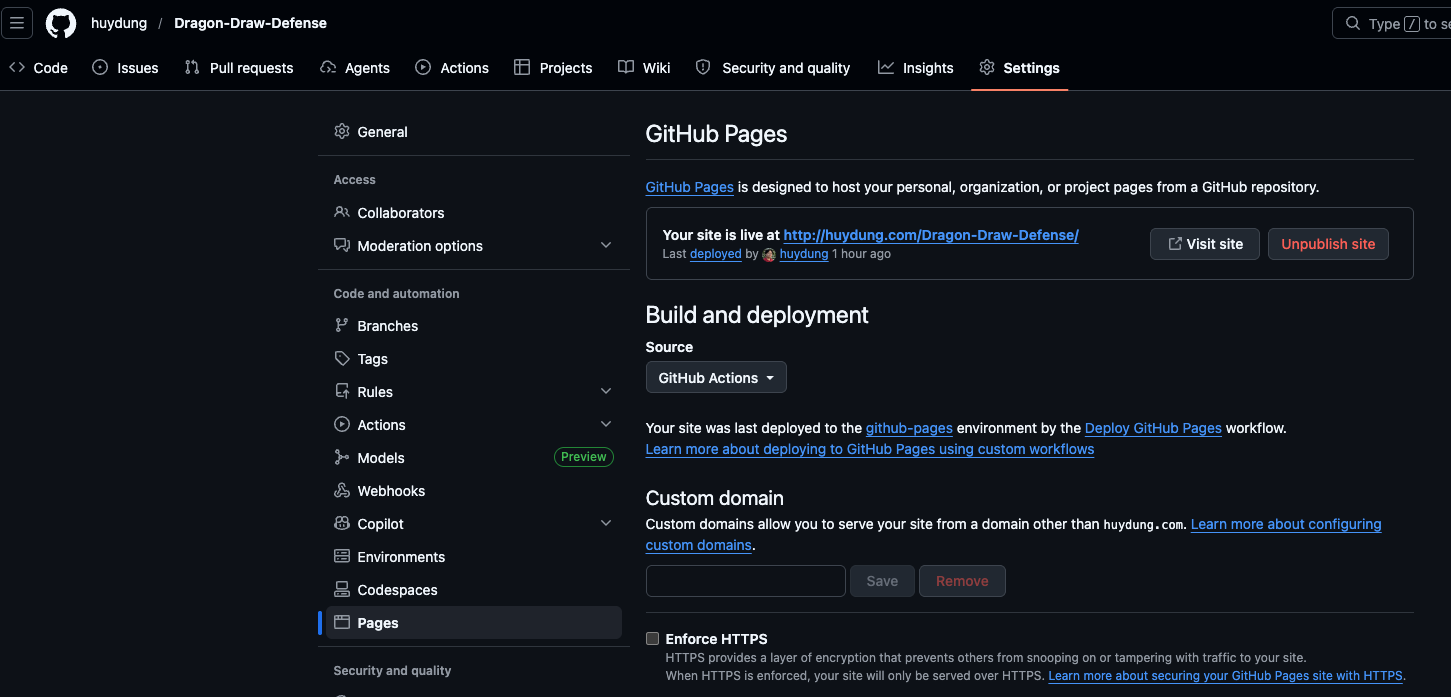
For an HTML game, this is easy. The agent writes the deploy workflow; you flip one setting in GitHub.
- Have the AI prepare the GitHub Pages workflow and push it.
- In GitHub → Settings → Pages, set Source to "GitHub Actions".
- Confirm the live URL works on both desktop and a real phone.
- Send the link to playtesters and collect feedback — the whole point of a prototype.
- Remember, it's just a prototype! Code will be rough, performance may be uneven, and bugs are expected.
Prepare this project for a GitHub Pages workflow that auto-publishes after every push to the main branch.

Do everything you can yourself (create the workflow file, set the correct build/base settings, commit, push). Then tell me exactly what I need to do on my side in the GitHub web UI, step by step.
The GitHub Pages setting is the only manual step in the web UI. After that, every push to GitHub will
automatically update the live version. Share the link with playtesters immediately: getting real hands
on the prototype is the whole point.
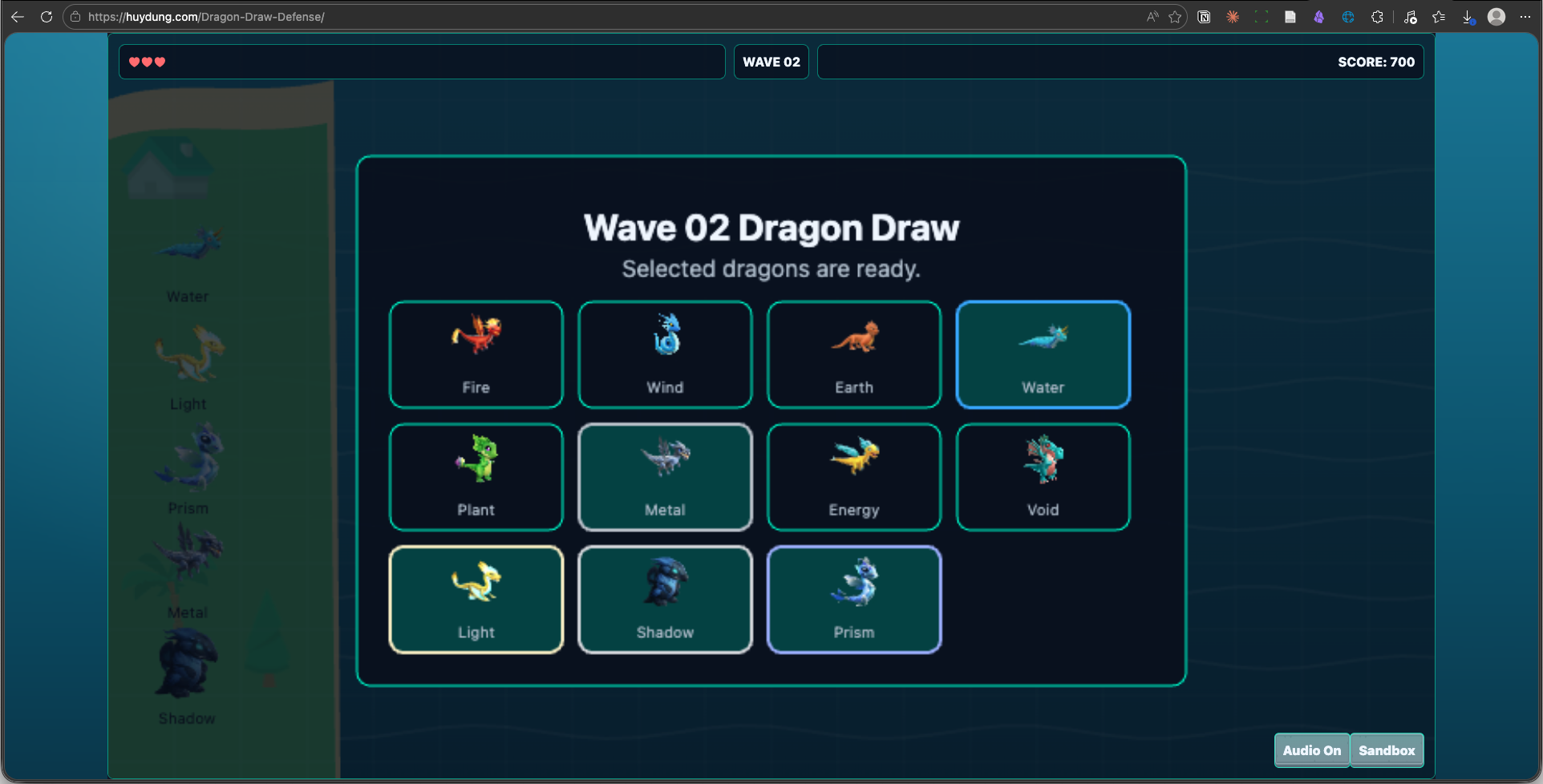
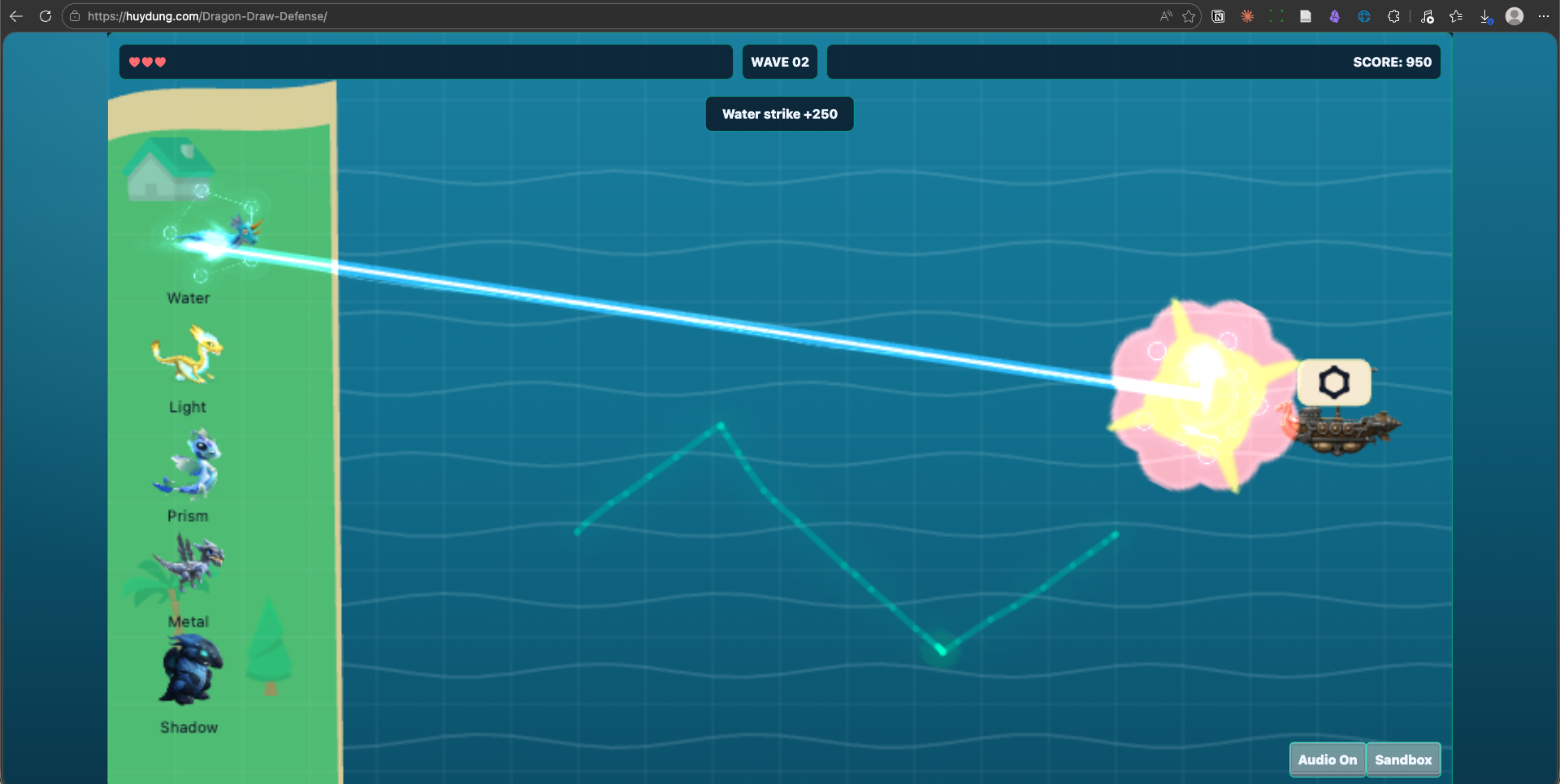
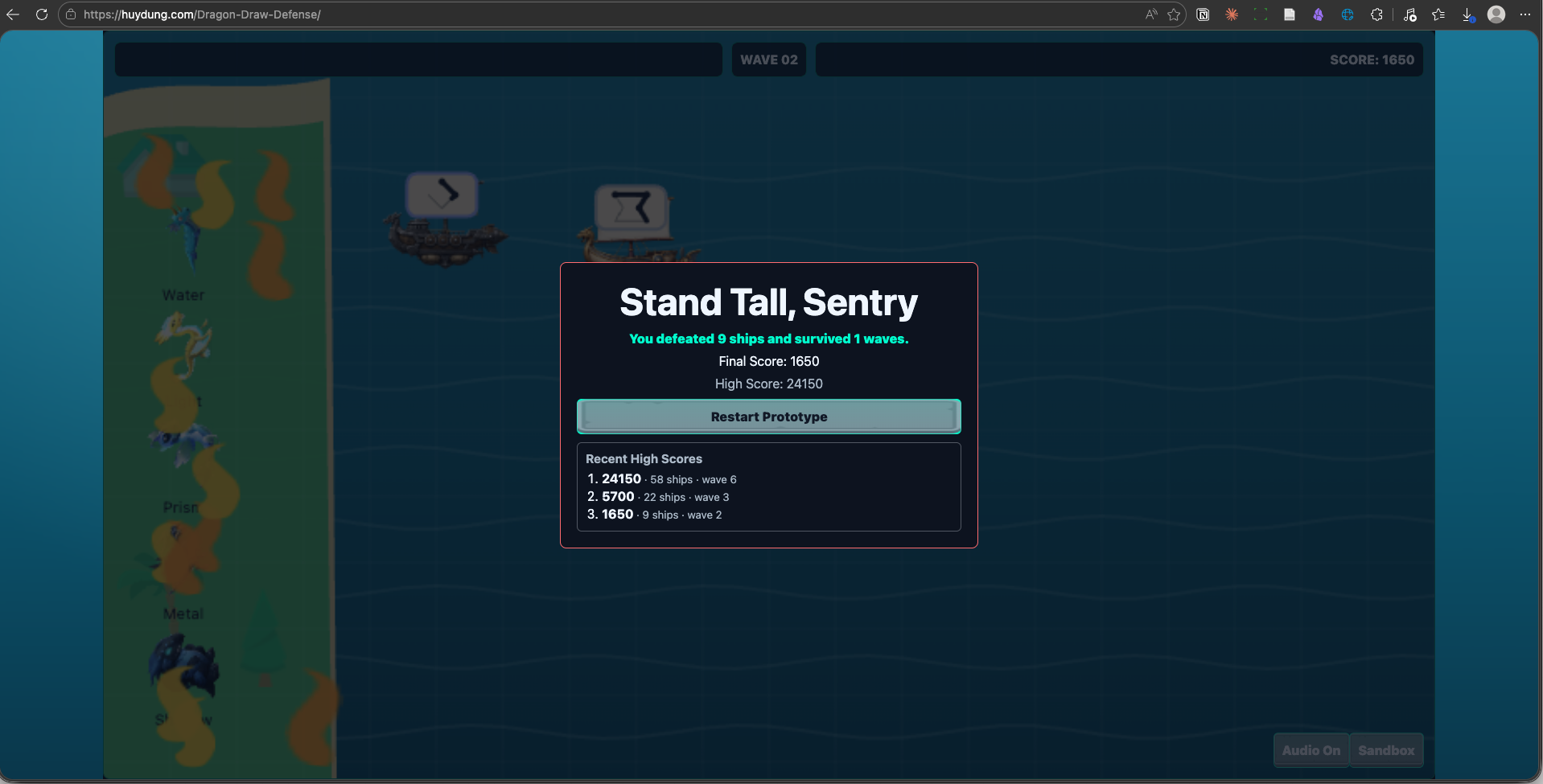
Here's a look at Dragon Draw Defense:
One-glance recap
| Phase | Output | Model | Tool |
|---|---|---|---|
| 1 · Idea | A rough game idea | Mid | Chat AI |
| 2 · Game Design | All the design decisions in GDD | Mid | Chat AI (Gemini Canvas) |
| 3 · Tech Design | Tech architecture and best practices in TDD | Highest | Agent |
| 4 · Project Plan | Milestones with a detailed task list | Highest | Agent |
| 5 · Build | Functional prototype | Mid first, escalate if stuck | Agent + VS Code |
| 6 · Iterate | Playable prototype | Mid first, escalate if stuck | Agent |
| 7 · Fix bugs | Enjoyable prototype | Mid first, escalate if stuck | Agent |
| 8 · Ship | Sharable prototype | Mid | GitHub Pages |
A small prototype can realistically be done in 2–6 hours across 2–3 sessions (token limits reset on a 5-hour rolling window). If you've proven the mechanic is fun, you're done — stop there. That was the goal.